
One Deadline, Three Time Zones: Put the Right Date on the Calendar
A London organiser writes “Thursday at three.” In New York that could be a morning call. In Tokyo it could already be Friday. Before anyone books a room or sets an alarm, turn the message into one dated moment that every participant can check.
By Max Clark ·
Get the missing part of the invitation
A useful meeting notice names the day, the time and the place whose clock it follows. “Thursday at three” leaves all three open to interpretation once a message has been forwarded for a few days. Ask the organiser for the calendar date, whether three means morning or afternoon, and a city or named time zone. A venue address can help with a local meeting. For a remote event, use the zone in the organiser’s notice even if their office has a different address.
Copy the wording before doing the conversion. If the original says 15 January at 15:00 UTC, keep that line with the invitation. UTC is a common reference clock that does not move forward or back for summer. A city clock can change its offset from UTC during the year. The original time gives everyone somewhere to start if a calendar application later displays an unexpected day.
An application cutoff needs an extra question. Does “due Friday” mean Friday at the start of the day, the close of business or the last minute of the day? Converting the wrong interpretation very precisely still gives the wrong deadline. Check the portal or the written rules for an actual time, and keep the wording with your working note.
Translate one moment, then read every date
Open the Time Zone Converter and try the example. Its reference is 15 January 2026 at 15:00 UTC. In London the example shows Thursday afternoon. In New York it reads 10:00 on Thursday. In Tokyo it reads 00:00 on Friday, 16 January. Those are three readings of the same moment. Nobody gets an extra day just because Friday appears on one of the cards.
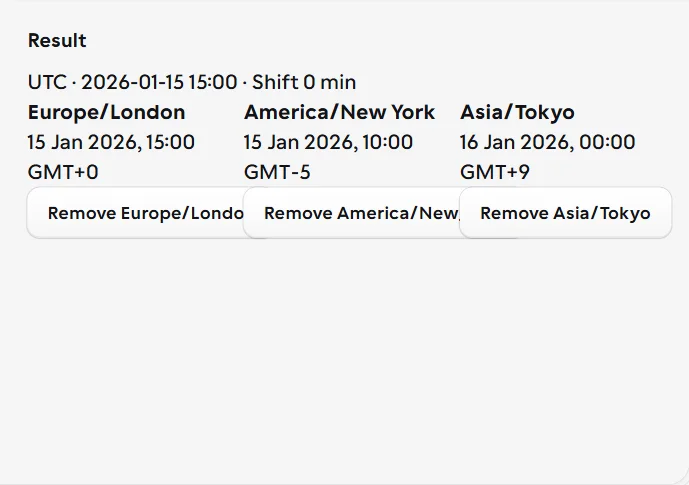
Write “Friday 16 January, midnight at the start of Friday” in a note for the Tokyo participant. Midnight on Thursday is easy to interpret two ways in conversation. A date followed by 00:00 makes the boundary explicit. If a friend still reads it as Thursday night, point to the previous minute. It was 23:59 on Thursday, so one minute later starts Friday.
Try moving the reference an hour later. New York moves from ten to eleven in the morning. Tokyo moves from midnight to one in the morning on the same Friday. This is a quick way to see who loses sleep if a meeting slips. If the new slot is unacceptable, offer a second time with the dates already converted for all participants. “One hour later” is a poor invitation on its own once several revisions are circulating.
A summer offset is not a permanent rule
Someone who works with the same two offices often learns the usual time difference by heart. That works on many dates and fails on exactly the dates when a missed call is hardest to explain. Regions that change their clocks do not all do it on the same weekend. Some regions leave their clocks alone throughout the year. A difference remembered from December can be wrong for a meeting in March.
Change the actual date in the converter while keeping the reference time fixed. Look at the displayed offset beside each city. A label such as GMT minus five means the local clock is five hours behind the reference at that moment. It is a description of that date. It is not a promise about the next appointment. Use a city such as America/New_York when the event follows that city’s clock.
For a recurring call, decide whose clock stays fixed. A weekly class that starts at 9 a.m. in the teacher’s city should stay anchored there. Students elsewhere may see a temporary change in the time on their own calendar. For a broadcast that starts at the same UTC hour every week, the city time can move instead. Put the governing rule in the series description and inspect a date on each side of the next clock change.
Work backward from the real cutoff
Suppose a submission closes at 17:00 in the organiser’s zone. Your packet needs forty minutes of final reading and you want twenty minutes for a slow upload or a rejected attachment. Your working deadline is an hour earlier than the portal deadline. Record both times and label them. Otherwise a helpful colleague may see the spare hour and fill it with more changes.
The Time Calculator handles durations such as forty minutes plus twenty minutes. Use it to add the pieces of work, then place the total against the converted cutoff. If you have separate people checking two documents at the same time, those tasks can overlap. If the second person must see the first person’s edits before signing, both durations belong in the plan.
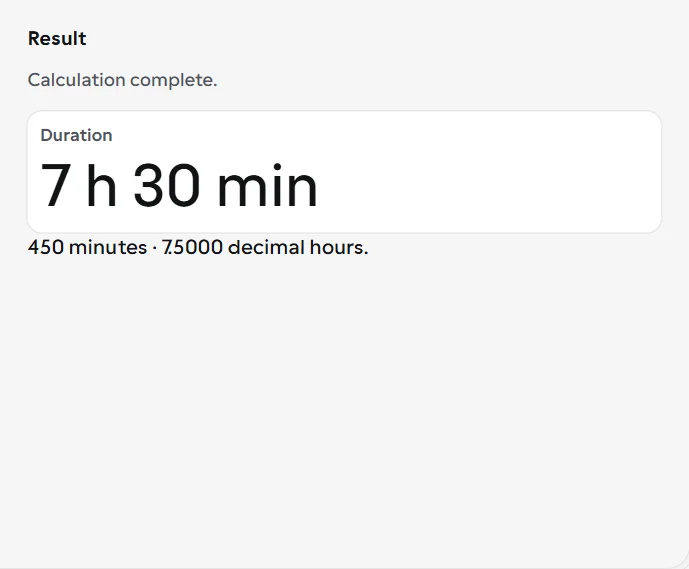
A clock interval can cross midnight even when the work itself is short. For example, checking uploads from 23:40 until 00:10 takes thirty minutes on an ordinary night. Mark the end as the next day. If the interval crosses a local clock change, use the two real moments expressed in UTC to get elapsed time. A simple clock calculator that treats a day as twenty-four hours cannot reconstruct which occurrence of a repeated local hour you meant.
Separate a number of days from a date on the roster
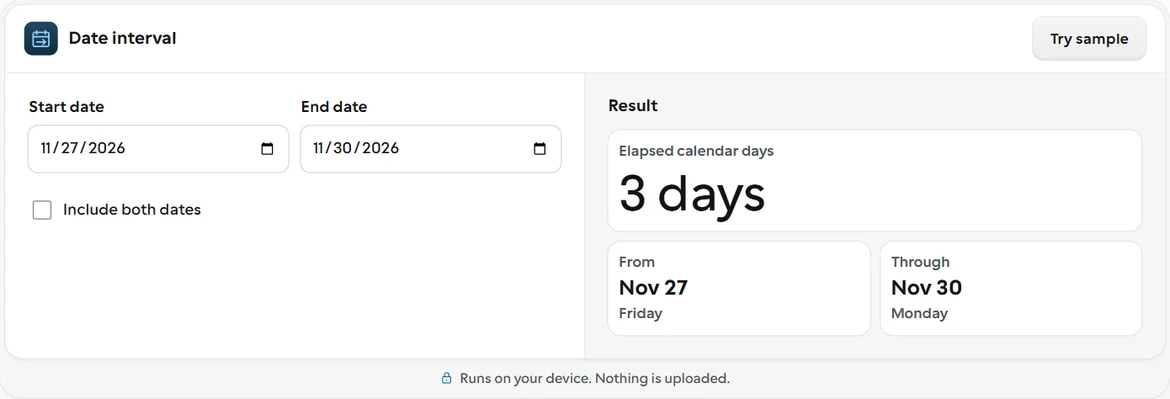
If the organiser says a document will arrive three days before a meeting, put the meeting date and the expected delivery date into the Date Difference Calculator. Decide whether the wording describes three elapsed days or three named calendar dates including the meeting day. A Friday-to-Monday gap is three elapsed days. Someone who needs a person on duty every date from Friday through Monday has four dates to cover.
Do not turn “three business days” into “three calendar days” out of convenience. The weekend pattern, public holidays and the organisation’s counting convention all matter. A holiday at the receiving office can count even if it is a normal working day where you live. For a more detailed calendar example, see the guide to counting nights and dates on a roster.
An age cutoff is another case where the named date matters more than the current date. If a programme says “eligible on the first day of the course,” use that day when interpreting its rule. A birthday between today and the event can change the answer. Keep the eligibility date separate from the earlier deadline for sending the application.
Send an invitation people can check
A short invitation can say, “Thursday 15 January 2026, 15:00 UTC. London 15:00 Thursday, New York 10:00 Thursday, Tokyo 00:00 Friday 16 January.” Put the meeting link on a separate line. Someone opening the note on a phone can now see both the original time and the day they need to reserve.
If the meeting moves, include the full replacement date and time. Repeating the original text with “actually an hour earlier” makes the next reader search the conversation for which earlier message you meant. Update the calendar invitation as well as the chat message. Ask one participant in a different zone to read back the day and time shown by their calendar if the event is important.
For a deadline, save the portal’s confirmation number before closing the tab. A timer going off tells you that your reminder worked. It cannot tell you that a submission reached the server. Use the Timer and Stopwatch for a short rehearsal, such as timing an upload check during a practice session. Set a device or calendar alarm for an appointment that must alert you while a phone is asleep.
Put the reminder and cutoff on your calendar
A shared calendar can hold both your personal reminder and the organiser’s cutoff. Give them distinct names, especially on a small screen. “Finish reading the packet” belongs before “Portal closes.” If the meeting changes, adjust both entries and keep the organiser’s latest written notice as your reference.
Reader questions
What if the message gives a city time but the converter starts in UTC?
Use a known dated UTC time from the event invitation where possible. Otherwise adjust the reference until the organiser’s city card matches both its stated date and clock time. Read the other cards only after that match. If the clock repeats that hour, ask the organiser to confirm the offset.
Can I use the time on a forwarded email?
The email timestamp normally describes when the message was sent. The event time belongs in the message or its calendar attachment. A forwarded copy can display the send time in your own zone even when the event follows somebody else’s clock.
Why did a meeting move on my phone after I travelled?
A calendar can display the same event in the device’s current time zone. Compare the UTC reference and the event’s own time zone with the notice before moving the appointment. A new display time can be correct even though the event has not changed.
Are my dates sent to the organiser when I use these tools?
The calculations run in your browser. Checking a date here does not create an invitation, set a device alarm or notify the organiser. Save your chosen time in the calendar or reminder system you actually use.